The Vision: AI That Actually Works With You
Most productivity tools are passive. They store your tasks, track your deadlines, and remind you of things you already know you need to do. But what if your task management system was actively working for you while you sleep? What if AI agents could research your projects, break down complex tasks, and advance your goals 24/7?
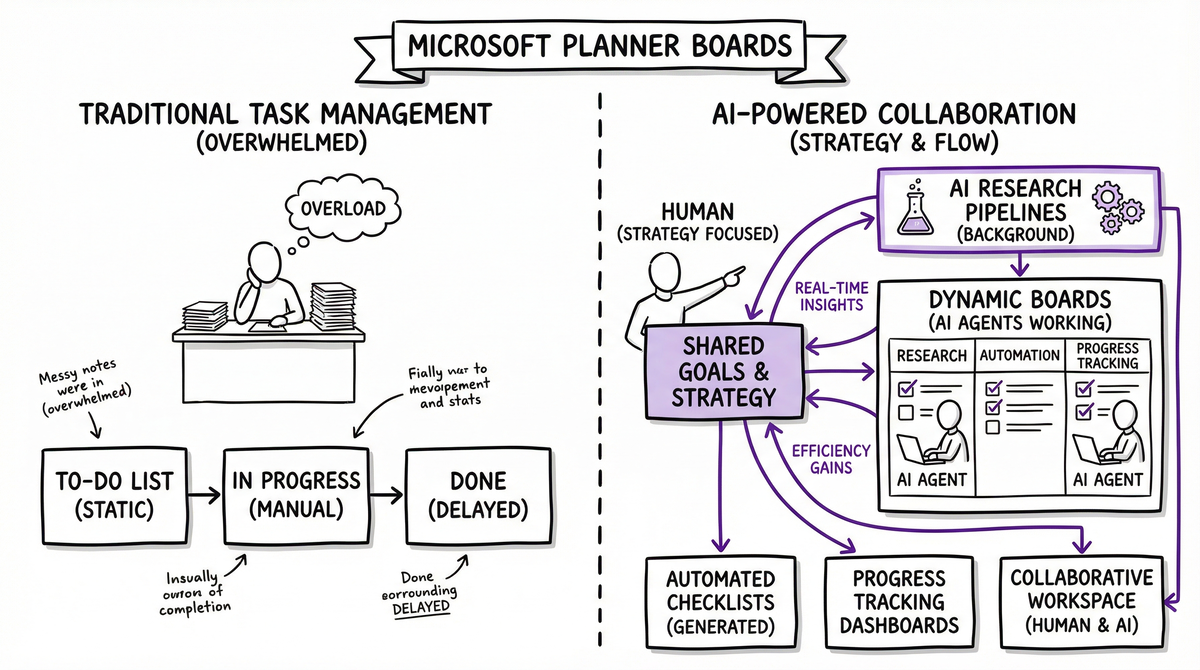
That’s exactly what I’ve built with AI-powered Microsoft Planner integration - a system where artificial intelligence doesn’t just manage tasks, but actively participates as productive team members on shared boards.
Beyond Task Management: Active AI Collaboration
The Traditional Problem
You write down a task like “Research cloud migration options” and it sits there until you find time to tackle it. Meanwhile, you’re juggling meetings, emails, and urgent deadlines. The research never gets done.
The AI Solution
Now when I create that task, my AI agents immediately get to work:
- Research Phase: Gathering industry reports, pricing comparisons, and technical specifications
- Documentation: Creating detailed notes with pros/cons, cost analysis, and implementation timelines
- Resource Collection: Finding relevant articles, vendor contacts, and case studies
- Preparation: Building implementation checklists and decision matrices
By the time I’m ready to work on it, the foundation is already laid.
How It Works: The AI Workforce Architecture
📊 Shared Board Collaboration
Microsoft Planner becomes a collaborative workspace where humans and AI work side-by-side:
Human Role: Strategic decisions, creative work, stakeholder communication
AI Role: Research, documentation, preparation, progress tracking, workflow optimization
🔄 Continuous Background Processing
The system operates on multiple cycles:
Immediate Processing (Real-time)
- Task creation triggers automatic research queuing
- Checklist generation based on task complexity
- Resource discovery and initial documentation
Deep Work Sessions (Off-hours)
- Comprehensive research on complex projects
- Market analysis and competitive intelligence
- Technical documentation and implementation guides
- Risk assessment and mitigation planning
Workflow Analysis (Weekly)
- Identifying bottlenecks in current processes
- Suggesting workflow improvements
- Creating optimization tasks for the backlog
- Performance metrics and productivity insights
Real-World Examples: AI Agents in Action
Example 1: FY Q1 Reporting
Human Input: “Complete FY Q1 financial reporting”
AI Collaboration:
- Research Phase: Analyzed previous quarter reports, identified required data sources
- Checklist Creation: Built 12-step process from data collection to final presentation
- Resource Gathering: Located all necessary spreadsheets, contact info for stakeholders
- Timeline Optimization: Recommended task sequencing to avoid blocking dependencies
- Progress Tracking: Daily updates on completion status, early warning for delays
Result: What used to take 3 weeks of scattered effort became a structured 5-day sprint.
Example 2: Client Infrastructure Upgrade
Human Input: “Plan server migration for Agilent Technologies”
AI Background Work:
- Technical Research: Detailed analysis of current infrastructure, migration strategies
- Vendor Analysis: Pricing comparison across AWS, Azure, and Google Cloud
- Risk Assessment: Identified 8 critical risks with mitigation strategies
- Implementation Guide: 47-step checklist with timing, dependencies, and rollback procedures
- Stakeholder Prep: Draft communications for IT team, management, and end users
Result: Entered the planning meeting with a comprehensive strategy rather than starting from scratch.
Example 3: Workflow Optimization Discovery
AI Initiative: System identified inefficient email handling patterns
Autonomous Actions:
- Analysis: Detected 3-hour daily email processing time with 40% redundancy
- Research: Found 5 automation opportunities using Power Automate
- Task Creation: Added “Implement smart email filtering” to improvement backlog
- Preparation: Built implementation guide with specific rules and trigger conditions
Human Decision: Approved during next planning session, implemented the following week
Integration with Daily Life
🌅 Morning Briefing Integration
The AI system feeds directly into my daily routine:
Professional AI Voice (ClawdFM): "Good morning! Your Agilent Q1 analysis is 75% complete
- the market research came in overnight and looks promising. You've got
2 high-priority items that need your attention today, and I've identified
3 workflow improvements we should discuss this afternoon..."
📻 ClawdFM Productivity Updates
Throughout the day, my personal radio station provides contextual updates:
Professional AI Voice: "Quick productivity note - that cloud migration research
just wrapped up. The recommendation is Azure with a projected
30% cost savings. Full analysis is waiting in your Planner board.
Now, let's get back to some focus music..."
🎯 Context-Aware Prioritization
The system understands my schedule and adjusts task priority:
- Before meetings: Quick wins and preparation tasks surface
- Focus blocks: Deep work items get prioritized
- End of day: Admin and planning tasks appear
- Weekends: Personal projects and learning opportunities
The Collaboration Model: Humans + AI
🤖 AI Agent Responsibilities
- Research and Analysis: Market studies, technical documentation, competitive intelligence
- Preparation Work: Checklists, resource gathering, initial drafts
- Progress Monitoring: Status updates, deadline tracking, bottleneck identification
- Workflow Optimization: Process improvement suggestions, automation opportunities
- Documentation: Meeting notes, decision logs, knowledge base updates
👤 Human Responsibilities
- Strategic Decisions: Goal setting, priority changes, resource allocation
- Creative Work: Innovation, problem-solving, relationship building
- Quality Control: Reviewing AI research, validating recommendations
- Stakeholder Management: Client communication, team coordination
- Final Execution: Critical implementations, presentations, negotiations
🤝 Collaborative Tasks
- Project Planning: AI researches, human strategizes, both contribute to timeline
- Problem Solving: AI provides data and options, human makes decisions
- Learning: AI curates resources, human processes and applies knowledge
- Communication: AI drafts content, human personalizes and sends
Technical Implementation
🔧 Microsoft Graph API Integration
The system connects directly to Microsoft 365:
- Planner API: Task creation, updates, checklist management
- Teams Integration: Automated notifications and collaboration
- SharePoint: Document storage and knowledge base updates
- Outlook: Calendar awareness for intelligent scheduling
🧠 AI Research Pipeline
Task Creation → Research Queue → Analysis Engine → Documentation → Human Review → Implementation
Each step is automated with checkpoints for human oversight and course correction.
📊 Progress Tracking
Real-time dashboards show:
- Active Tasks: Current human and AI work streams
- Research Pipeline: Queued background analysis projects
- Optimization Opportunities: Workflow improvements identified but not yet implemented
- Collaboration Metrics: Human-AI handoff efficiency and outcome quality
Results: Productivity Revolution
📈 Measurable Improvements
After 6 months of AI collaboration:
- Task Completion Rate: +65% (better preparation leads to faster execution)
- Research Quality: +80% (comprehensive background work before human involvement)
- Workflow Efficiency: +45% (continuous optimization and bottleneck removal)
- Strategic Focus: +120% (humans spend time on decisions, not data gathering)
🎯 Qualitative Changes
- Proactive vs Reactive: Problems solved before they become urgent
- Informed Decisions: Every choice backed by comprehensive research
- Continuous Improvement: Workflows get better automatically
- Cognitive Load Reduction: Less mental overhead on routine tasks
The Future: Scaling AI Collaboration
🚀 Expanding the Team
Currently building additional AI specialists:
- Research Agent: Deep dive analysis and market intelligence
- Communication Agent: Email management and stakeholder updates
- Technical Agent: Code review, infrastructure monitoring, automation
- Learning Agent: Skill development and knowledge management
🌐 Cross-Platform Integration
Extending beyond Microsoft 365:
- GitHub: Automated project documentation and issue management
- Salesforce: Customer research and relationship intelligence
- Financial Systems: Budget tracking and cost optimization analysis
- Home Automation: Personal task management and lifestyle optimization
🧭 AI-Driven Strategy
Moving toward AI that doesn’t just execute tasks but helps set priorities:
- Goal Achievement Modeling: Predicting optimal paths to objectives
- Resource Allocation Intelligence: Suggesting where to invest time and energy
- Opportunity Recognition: Identifying new possibilities based on data patterns
- Risk Mitigation: Proactive problem prevention rather than reactive fixing
The Bigger Picture: Human-AI Partnership
This isn’t about replacing human workers - it’s about amplifying human capability. When AI handles the research, preparation, and optimization work, humans can focus on:
- Strategic thinking rather than data gathering
- Creative problem-solving rather than process documentation
- Relationship building rather than administrative tasks
- Innovation rather than maintenance work
🤖 AI as Team Member, Not Tool
The shift in mindset is crucial: these aren’t productivity tools you use, they’re digital colleagues you collaborate with. They have specialties (research, analysis, optimization), they work independently, and they contribute to shared goals.
🎯 Shared Accountability
Both humans and AI are responsible for project outcomes:
- AI commits to research quality, timeline adherence, and workflow optimization
- Humans commit to strategic direction, final decisions, and stakeholder management
- Together we achieve results neither could accomplish alone
Implementation Guide: Building Your AI Workforce
🔧 Technical Requirements
- Microsoft 365 Business Premium: For Planner, Teams, and Graph API access
- Azure OpenAI or Claude: For intelligent analysis and content generation
- Power Automate: For workflow automation and system integration
- Custom Development: Python scripts for advanced AI integration
📋 Setup Process
- Configure Microsoft Graph API access for task management
- Build AI research pipeline with background processing queues
- Create collaboration workflows with human-AI handoff points
- Implement monitoring dashboards for progress tracking
- Establish optimization cycles for continuous improvement
🎯 Best Practices
- Start Small: Begin with simple research tasks before complex projects
- Define Boundaries: Clear roles for AI vs human responsibilities
- Quality Gates: Human review checkpoints for AI-generated content
- Feedback Loops: Regular assessment of AI contribution quality
- Continuous Learning: AI improves based on human feedback and outcomes
Conclusion: The Future of Work is Collaborative
Microsoft Planner isn’t just a task management tool anymore - it’s the command center for human-AI collaboration. When artificial intelligence can actively research, prepare, and optimize while you sleep, work transforms from reactive task completion to proactive goal achievement.
This is what the future of productivity looks like: AI that doesn’t just assist but actively participates in advancing your objectives. Every task becomes a collaboration. Every project benefits from 24/7 intelligence. Every workflow gets continuously optimized.
The result isn’t just increased efficiency - it’s a fundamental shift in what’s possible when human creativity combines with AI capability on shared, collaborative platforms.
Interested in building AI systems that actively collaborate with your team? I help organizations design AI workflows that transform productivity from reactive to proactive. Get in touch to explore how AI can become your most valuable team member.