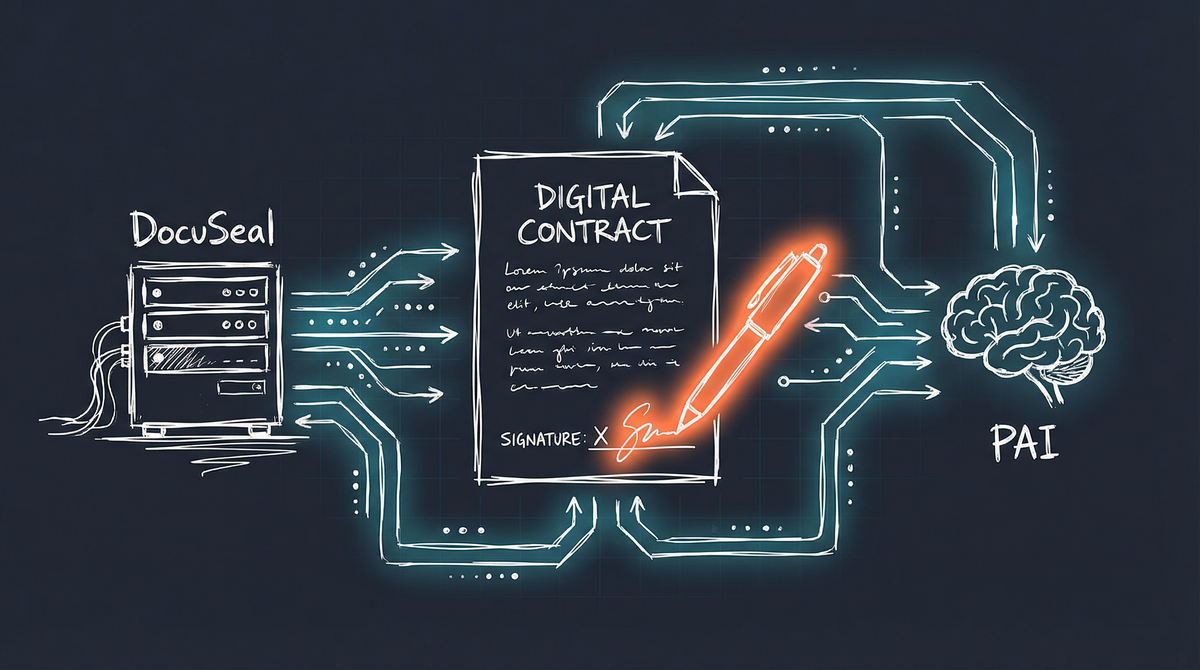
“Create an MSA for Sarah at Northwind Industries, a Delaware corporation.”
That’s all I said. Within seconds, PAI had generated a professional Master Services Agreement, pre-filled the client details, and sent signature requests to both parties. No template hunting. No copy-paste errors. No forgetting to update the entity type.
This is what contract automation looks like when your AI has the right tools.
The Contract Problem
I built this system for a friend who runs a consulting business. Their workflow involves contracts - lots of them. NDAs before discovery calls. MSAs before engagements. SOWs for each project phase. Amendments when scope changes.
The traditional workflow:
- Find the right template (where did I put that?)
- Copy it, update client details (did I catch them all?)
- Export to PDF (hope the formatting holds)
- Upload to DocuSign/HelloSign (there goes $30/month)
- Send for signature (wait, wrong email?)
- Follow up manually (did they get it?)
- File the executed version (somewhere I’ll find it later)
Each step is a chance for error. Each step takes time. And each step happens over and over, contract after contract.
Enter DocuSeal
DocuSeal is an open-source e-signature platform that I now self-host on my infrastructure. Think DocuSign, but:
- Self-hosted - Runs on my own servers
- No per-document fees - Unlimited signatures
- Full API access - Complete programmatic control
- Data sovereignty - Contracts never leave my infrastructure
The stack is simple: a single Docker container behind my reverse proxy.
services:
  docuseal:
    image: docuseal/docuseal:latest
    volumes:
      - docuseal_data:/data
    environment:
      - DATABASE_URL=sqlite3:/data/docuseal.db
Five minutes to deploy. Zero ongoing costs beyond compute.
The PAI Integration
Having DocuSeal running is table stakes. The magic happens when PAI can orchestrate the entire contract lifecycle.
What PAI Can Now Do
Generate contracts from natural language:
"Create an NDA for Riverstone Brewing"

PAI:
1. Identifies the NDA template
2. Looks up or creates the client record
3. Pre-fills all client-specific fields
4. Creates a submission in DocuSeal
5. Sends signature requests to both parties
Track signature status:
"What contracts are waiting for signatures?"

PAI queries DocuSeal API and reports:
- MSA for Northwind Industries: Awaiting client signature
- NDA for Acme Corp: Completed yesterday
- SOW Amendment: You haven't signed yet
Handle the document lifecycle:
"Sarah signed the MSA. What's next?"

PAI:
1. Confirms signature completion
2. Downloads the executed document
3. Files it in the client's OneDrive folder
4. Creates a follow-up task for project kickoff
5. Updates the CRM record
The Technical Bridge
The integration uses DocuSeal’s REST API with a simple authentication token:
curl -X POST "https://contracts.meekertechnologies.com/api/submissions" \
  -H "X-Auth-Token: $DOCUSEAL_API_KEY" \
  -H "Content-Type: application/json" \
  -d '{
    "template_id": 3,
    "send_email": true,
    "submitters": [
      {
        "role": "First Party",
        "email": "[email protected]",
        "name": "Your Name"
      },
      {
        "role": "Second Party",
        "email": "[email protected]",
        "name": "Client Name"
      }
    ]
  }'
PAI wraps this in a skill that handles template selection, field mapping, and error handling. The user never sees the API—they just describe what they need.
The Template System
Good contract automation requires good templates. I’ve built a template system that balances flexibility with consistency.
Template Design Principles
Fillable fields, not hardcoded values:
<p>This Agreement is entered into as of _________________
   by and between:</p>

<p><span class="party-name">Meeker Technologies</span>,
   an Iowa limited liability company...</p>

<p><span class="party-name">_________________________</span>,
   _________________________, with its principal place of
   business in _________________________</p>
Blanks instead of brackets. DocuSeal maps form fields to these locations, and clients see clean, professional documents—not [CLIENT_NAME] placeholders.
Standalone governing documents:
My MSA serves as the umbrella agreement. Each engagement gets a separate SOW or Service Quote that references the MSA. This means:
- One MSA per client relationship (sign once)
- Many SOWs over time (sign each project)
- Amendment-friendly structure (no full re-execution)
- Clear hierarchy when terms conflict
Modern protective clauses:
The templates include provisions that matter in 2026:
- AI and Data Processing (Section 4.3): Explicit prohibition on using client data to train AI models without consent
- Security Incident Notification (Section 4.4): 48-hour breach notification requirement
- Extended warranty period: 90 days instead of the typical 30
These aren’t boilerplate additions—they’re the clauses clients increasingly expect and appreciate.
Architecture Overview
Here’s how the pieces fit together:
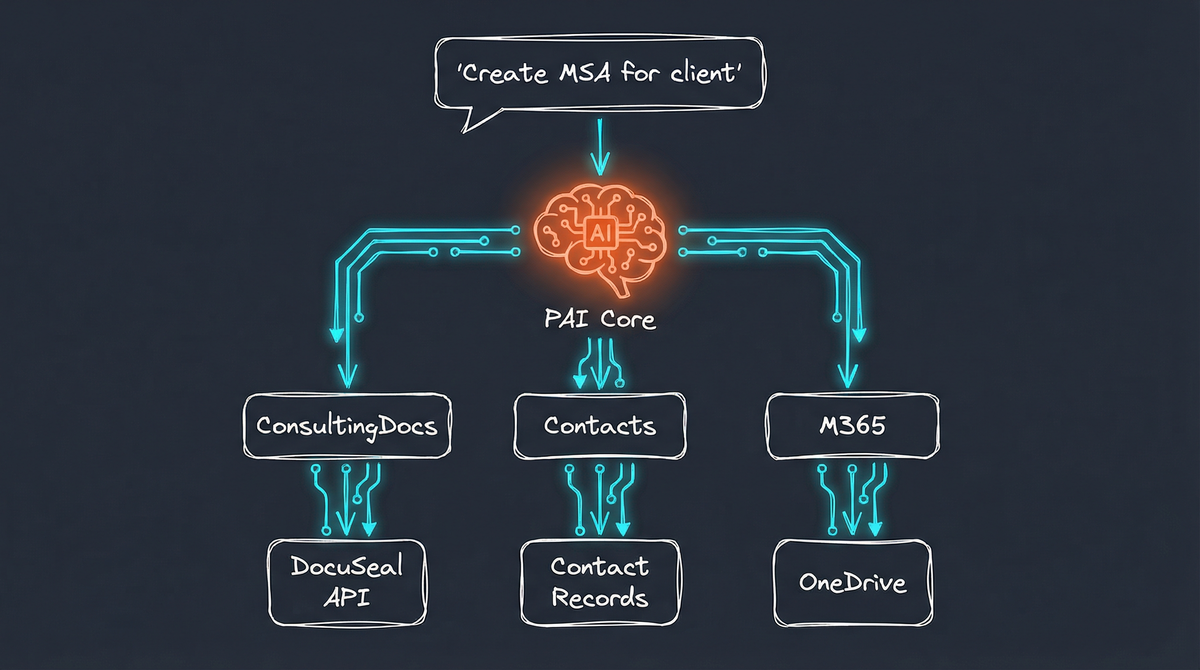
PAI coordinates across systems:
- ConsultingDocs Skill handles template selection and DocuSeal API calls
- Contacts Skill provides client information for pre-filling
- M365 Skill manages document storage and follow-up tasks
No single system knows about the others. PAI is the orchestration layer that makes them work together.
What This Enables
Scenario 1: New Client Onboarding
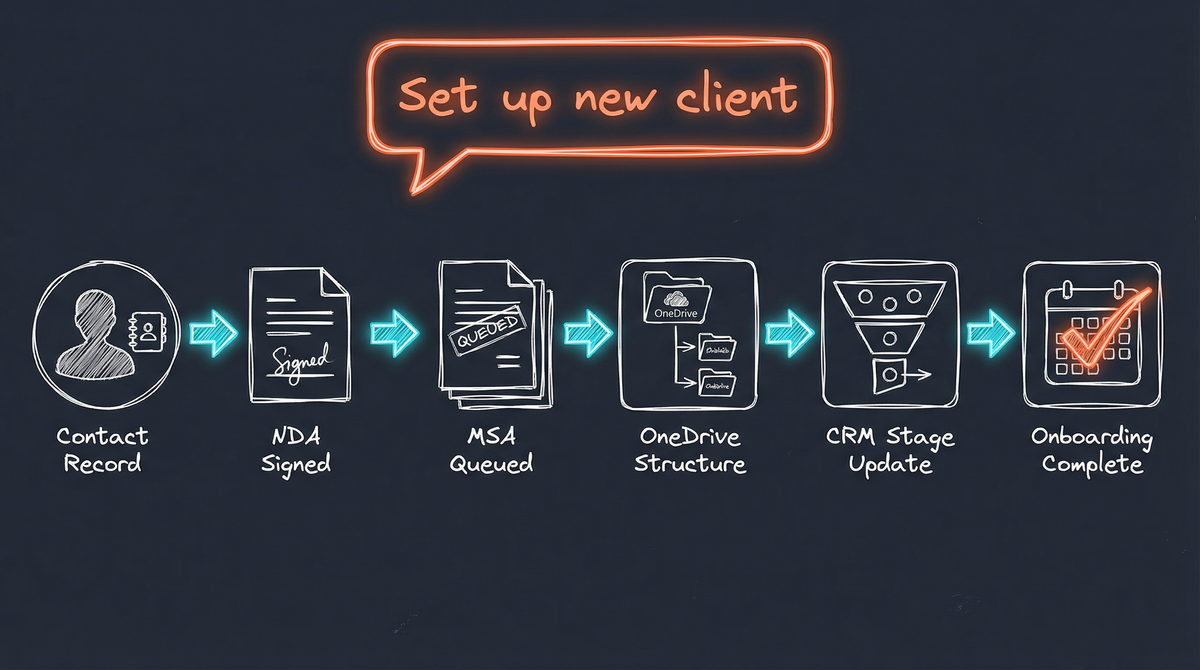
A single command—“Set up Northwind Industries as a new client”—triggers a complete onboarding sequence: contact record creation, NDA generation and signature request, MSA queued for after NDA execution, OneDrive folder structure provisioning, CRM pipeline update, and discovery call scheduling. Full client onboarding in one command.
Scenario 2: Project Kickoff
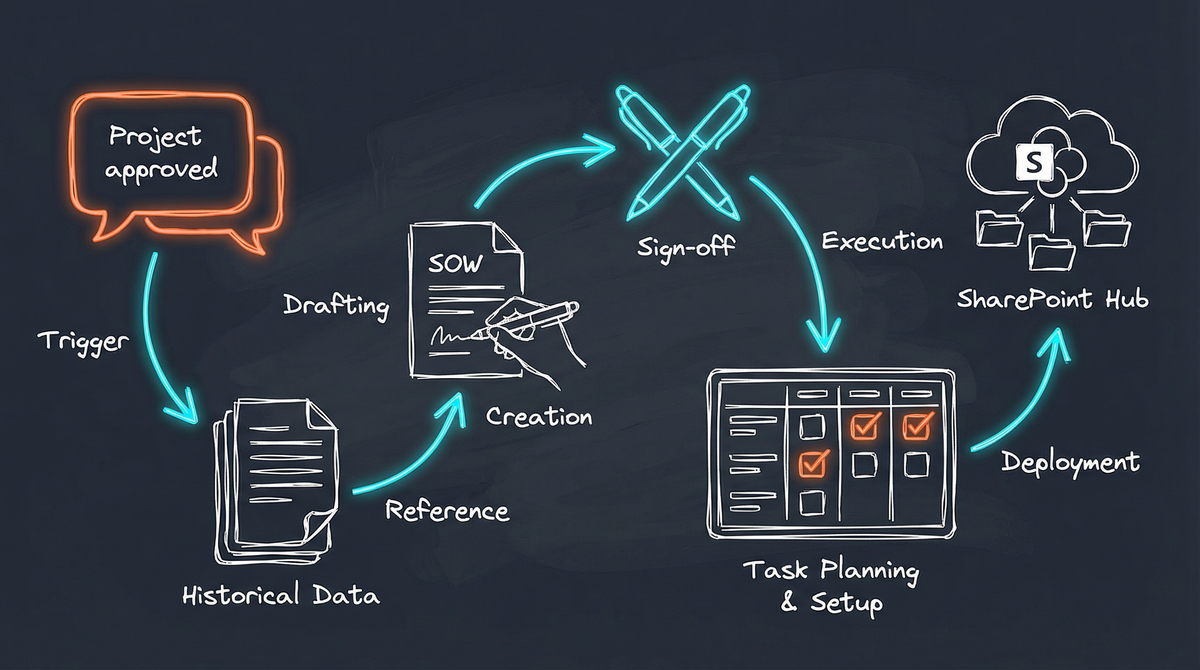
When Sarah approves the Q1 project, PAI orchestrates everything: pulls project details from earlier discussions, creates the SOW with specific deliverables and timeline, references the governing MSA, sends for dual signature, creates Planner tasks for project milestones, and provisions a SharePoint site for deliverables. Project paperwork done before the kickoff call.
Scenario 3: Contract Renewal
"The Acme MSA expires next month. What do we need?"

PAI checks:
1. Current MSA terms and expiration
2. Active SOWs under the agreement
3. Any requested amendments in email history
4. Updated template with current clauses

Then offers:
- Generate renewal MSA with updated terms
- Create amendment to extend existing
- Notify client of upcoming expiration

Result: Proactive contract management
The Self-Hosting Advantage
This entire workflow runs on infrastructure I control:
| Component | Location | Why It Matters |
|---|---|---|
| DocuSeal | Mac Mini | No per-signature fees |
| Templates | Local filesystem | Version-controlled, customizable |
| Executed contracts | OneDrive | Backed up, searchable, shareable |
| API credentials | Local .env | Never transmitted to third parties |
Every contract, every signature, every audit trail—all on my systems. When a client asks “where is our data stored?”, I have a concrete answer.
Future Enhancements
The foundation is in place. Here’s what’s coming:
Template intelligence:
- Auto-select template based on engagement type
- Suggest clause modifications for specific industries
- Flag unusual terms for review
Signature tracking:
- Daily digest of pending signatures
- Automatic follow-up reminders
- Escalation for time-sensitive contracts
Integration depth:
- InvoiceNinja integration (quote accepted → MSA generated)
- Calendar integration (meeting scheduled → NDA sent)
- CRM integration (deal closed → full document package)
Compliance automation:
- Contract expiration monitoring
- Renewal reminders
- Clause update propagation across templates
The Bigger Picture
Contract management is one piece of the business automation puzzle. Combined with InvoiceNinja for billing and M365 for productivity, PAI now handles significant portions of business operations.
The pattern repeats:
- Identify repetitive business process
- Self-host the core system
- Expose via API
- Let PAI orchestrate
Each integration makes the whole more capable. The lines between “contract system” and “billing system” and “project management system” blur when one AI coordinates them all.
What used to be “create contract, then invoice, then file, then follow up” becomes “start the Northwind engagement”—and everything downstream happens automatically.
Interested in building AI-powered business automation for your organization? I help companies design systems that reduce administrative overhead while maintaining control over their data. Get in touch to explore what’s possible.