There’s something magical about an AI that can actually speak to you. Not through a chat interface, not through notifications on your phone, but through the speakers in your home, with a voice that has personality.
Today I’m excited to share how I gave PAI (my Personal AI Infrastructure) the ability to speak - using local, GPU-accelerated text-to-speech that runs entirely on my own hardware, with 28 unique voice personas to choose from.
The Vision
I wanted PAI to be able to:
- Deliver morning briefings - Wake up to a personalized summary of your day, calendar, weather, and important updates
- Announce completions - When a long-running task finishes, hear about it instead of checking a terminal
- Provide real-time updates - Meeting summaries, important emails, system alerts
- Be accessible anywhere in the house - Through existing Sonos speakers, not dedicated hardware
The key insight: voice output transforms AI from a tool you use to an assistant that works alongside you.
The Architecture
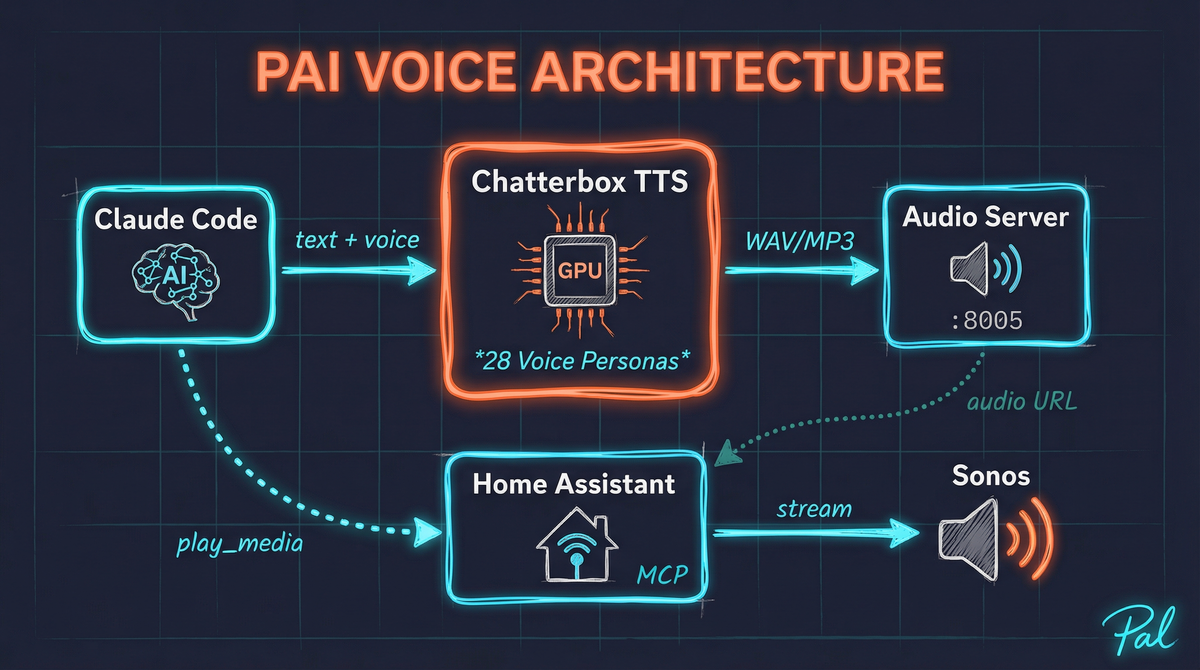
Here’s how the pieces fit together:
The Components
1. Chatterbox TTS Server
Chatterbox is an open-source, GPU-accelerated text-to-speech system. It runs locally, which means:
- No cloud API costs
- No latency from network round-trips
- Complete privacy - your text never leaves your network
- Full control over voices and customization
I run it on my RTX 4080 Super, and it generates speech in near real-time.
2. Audio Hosting Server
Sonos speakers need a URL to fetch audio from. A simple Python HTTP server hosts generated audio files, making them accessible to any device on the network.
3. Home Assistant Integration
PAI already has deep Home Assistant integration via MCP (Model Context Protocol). The media_player.play_media service lets me push audio to any Sonos speaker with a single API call.
4. Claude Code Orchestration
Claude Code ties it all together - generating the text, calling the TTS API, and triggering playback on the appropriate speaker.
Meet the Voices
Chatterbox comes with 28 built-in voice personas, each with their own personality. I asked each one to introduce themselves - here they are:

Abigail
Warm & FriendlyBrings warm, friendly energy to everything. Perfect for cozy morning briefings - like having a good friend catch you up on the day ahead.

Adrian
Smooth & ConfidentSmooth, confident tone that's great for delivering important information without drama. Your cool-headed advisor who keeps things professional.

Alexander
DistinguishedSounds rather distinguished. Excels at making even mundane tasks sound important. If you want your to-do list to feel like a royal decree.

Alice
Upbeat & FunBringing the energy! Upbeat and fun, makes sure you're actually excited to hear about your schedule. Perfect for getting kids pumped about bus time!

Austin
Casual & RealKeeps it real and casual - no stuffy announcements here. Like that chill friend who texts you reminders. Great for laid-back homes.

Axel
High EnergyBrings the hype! Need someone to announce that your long-running task is FINALLY done? Makes it feel like a touchdown. Maximum enthusiasm!

Connor
Calm & SteadyCalm, steady voice perfect for those moments when you need information delivered clearly without any stress. Reassuring presence.

Cora
SoothingWhat people call a soothing presence. Wonderful for meditation prompts, bedtime stories, or any time you need a voice that feels like a warm hug.

Elena
Warm & PassionateBrings a touch of warmth and passion to everything. Expressive, engaging, and makes even grocery lists sound interesting!

Eli
Tech-SavvyYoung, tech-savvy, and gets straight to the point. No fluff, just facts. Perfect for quick updates and keeping things moving.

Emily
All-RounderThe all-rounder. Friendly but professional, warm but clear. Works great for just about any announcement. Versatile like that!

Everett
CommandingDeep, resonant voice that commands attention without being intimidating. Excellent for important announcements that need to be heard.

Gabriel
Youthful & FunYouthful, energetic vibe perfect for fun announcements. Birthday reminders, game night notifications - makes everything feel like a celebration!

Gianna
ElegantBrings elegance and charm to every word. Sophisticated but approachable, perfect for when you want your smart home to feel like a five-star hotel.

Henry
Classic RefinedBrings a touch of classic refinement to your announcements. Think distinguished butler vibes without the stuffiness.

Ian
Casual & LikeableCasual, friendly, and sounds like someone you'd actually want to hang out with. Perfect for a home that doesn't take itself too seriously.

Jade
Bright & ClearBright, clear voice that cuts through the noise. Great for announcements that need to be heard across the house.

Jeremiah
Gravitas & WarmthBrings gravitas and warmth in equal measure. Whether it's a serious reminder or a heartfelt message, delivers with sincerity.

Jordan
Golden Retriever EnergyYour friendly neighborhood voice assistant! Approachable, energetic, and works great for families. Basically the golden retriever of voices.

Julian
Smooth & SophisticatedSmooth, sophisticated tone perfect for evening ambiance. Think jazz club announcer meets smart home assistant.

Layla
Sunny & CheerfulBringing sunshine to your speakers! Upbeat, melodic voice that makes even rainy day announcements feel cheerful.

Leonardo
CharismaticBrings charisma and flair to your announcements. Life is too short for boring notifications - adds some Italian passion to your routine!

Michael
Reliable & SteadyReliable, steady, and gets the job done. Think of him as your dependable co-pilot for daily life. Nothing fancy, just consistent quality.

Miles
Modern & CoolModern, cool vibe perfect for a contemporary smart home. Not trying too hard, just naturally chill.

Olivia
Professional & PersonableStrikes the perfect balance between professional and personable. Great for home offices and family schedules alike.

Ryan
TrustworthyFriendly, trustworthy voice that people naturally listen to. Like the reliable friend who always gives you the straight story.

Taylor
AdaptableAdaptable, modern, and perfect for any situation. Morning motivation? Got it. Bedtime calm? No problem. The Swiss Army knife of voices!

Thomas
Warm & WiseBrings a touch of warmth and wisdom to your home. Sounds like he's seen a few things, and delivers announcements with steady confidence.
Use Cases That Excite Me
Morning Briefings
Imagine waking up and hearing:
“Good morning! It’s Saturday, January 4th. Currently 28 degrees and partly cloudy. You have one event today - the girls have a birthday party at 2pm at Sky Zone. Traffic looks clear. Your Qualtrics dashboard shows 47 new survey responses overnight, with sentiment trending positive. Oh, and the Iowa Hawkeyes won last night, 78-65.”
All delivered in a voice you chose, through the speaker in your bedroom.
Executive Summary Mode
For busy leaders who can’t attend every meeting:
“Here’s your end-of-day summary. Three meetings were held today that you couldn’t attend. The product roadmap review resulted in Q2 priorities being locked in - mobile app redesign and API v3 are green-lit. The engineering standup flagged a potential delay on the auth migration, estimated one week. The customer success sync highlighted two at-risk accounts that need executive attention. Full notes are in your email.”
Catch up on your commute home instead of reading through hours of notes.
Phone-a-PAI
The most exciting possibility: a voice interface where you can actually talk to your AI assistant. Call a dedicated number, and PAI answers with its chosen voice. Have a real conversation about your schedule, get updates, or work through a problem together.
This brings AI assistance to contexts where screens don’t work - driving, cooking, exercising, or just sitting in your backyard.
Accessibility & Inclusion
Voice output opens up AI assistance to:
- Visual impairments - Full access to AI capabilities without screens
- Reading difficulties - Hear summaries instead of parsing dense text
- Language learners - Natural speech helps with comprehension
- Multitasking - Absorb information while doing other things
- Different learning styles - Some people simply process audio better
Technical Details
Server Setup
Chatterbox runs as a FastAPI server with CUDA acceleration:
# Using Python 3.10 (required for numpy compatibility)
cd ~/Chatterbox-TTS-Server
./venv/Scripts/python.exe -m uvicorn server:app --host 0.0.0.0 --port 8004
The API accepts text and returns WAV audio:
curl -X POST http://localhost:8004/tts \
  -H "Content-Type: application/json" \
  -d '{
    "text": "Hello from PAI!",
    "voice_mode": "predefined",
    "predefined_voice_id": "emily.wav",
    "output_format": "wav"
  }' \
  --output hello.wav
Auto-Start on Windows
Both servers launch automatically at system startup:
@echo off
:: Start Chatterbox TTS Server
start "Chatterbox TTS" cmd /c "cd /d C:\Users\ameek\Chatterbox-TTS-Server && venv\Scripts\python.exe -m uvicorn server:app --host 0.0.0.0 --port 8004"

:: Start Audio Server
start "PAI Audio Server" cmd /c "cd /d C:\Users\ameek\PAI\audio-server && py -3.10 server.py"
Home Assistant Integration
Playing audio on Sonos is a single MCP call:
mcp__hass__call_service_tool(
    domain='media_player',
    service='play_media',
    data={
        'entity_id': 'media_player.living_room',
        'media_content_id': 'http://10.0.0.168:8005/audio/announcement.mp3',
        'media_content_type': 'music',
        'announce': True  # Temporarily interrupt current playback
    }
)
Storage Optimization: WAV vs MP3
The voice samples on this page are served as MP3 files, which are about 6x smaller than the original WAV files:
| Format | 28 Voice Samples |
|---|---|
| WAV | 12 MB |
| MP3 | 1.9 MB |
For a blog post, MP3 makes sense. For real-time announcements, WAV is fine since they’re generated on-demand and not stored long-term.
Bonus: Voice Cloning in Action
Remember how I mentioned voice cloning as a future possibility? Well, the future arrived faster than expected.
Chatterbox supports voice cloning with just a short audio reference sample. You provide a few seconds of someone speaking, and it can generate new speech in that voice. I couldn’t resist testing this with a particularly distinctive voice…
My wife Tiffany asked if we could give PAI a professional voice. Challenge accepted.
I found a dataset of professional speech samples, fed one to Chatterbox as a reference, and generated this message for her:

Professional AI Voice Clone
PresidentialVoice cloned from reference audio. Chatterbox captures the cadence, pauses, and characteristic delivery remarkably well.
The transcript:
“Good evening, Tiffany. I wanted to take a moment to speak directly to you. Now, let me be clear about something. Adam is one lucky man. And I think he knows it.
You see, being a great partner and a wonderful mother, that’s not easy. It takes patience. It takes grace. It takes showing up every single day, even when you’re tired, even when things are hard. And from what I understand, you do that beautifully.
Ellie and Tessa, they have something special in you. A mom who cares deeply, who nurtures their curiosity, who makes them feel safe and loved. That’s the foundation of everything. That’s what shapes who they’ll become.
And your beauty, well, that speaks for itself. But it’s not just about how you look. It’s the kindness in your heart. It’s the way you light up a room. It’s the strength you carry with such elegance.
Adam knows he hit the jackpot. And tonight, I just wanted to make sure you heard it from someone else too. You’re doing an incredible job, Tiffany. Don’t ever forget that. Thank you for being you.”
Yeah. This technology is wild.
The voice cloning opens up fascinating possibilities - custom voices for your household, celebrity impressions for fun, or even preserving the voices of loved ones. All running locally, all private.
What’s Next
This is just the beginning. Future enhancements I’m planning:
More voice cloning experiments - Now that it works, why stop at one? Different voices for different contexts.
Contextual voice selection - Automatically choose the right voice for the situation. Serious news? Use Everett. Kids’ reminders? Use Alice.
Conversational interface - Full two-way voice interaction via phone or intercom.
Multi-room coordination - Different announcements to different rooms based on who’s where.
Emotional inflection - Adjust tone based on message sentiment.
The Bigger Picture
Giving PAI a voice isn’t just a cool feature - it’s a step toward AI that truly integrates into daily life. When your AI can speak naturally through the speakers already in your home, it becomes less of a tool you have to deliberately use and more of a helpful presence that’s just… there.
That’s the promise of Personal AI Infrastructure: AI that adapts to your life, not the other way around.
Want to build your own PAI? Check out Building Personal AI Infrastructure for the full overview, or explore the PAI GitHub repository for the code.