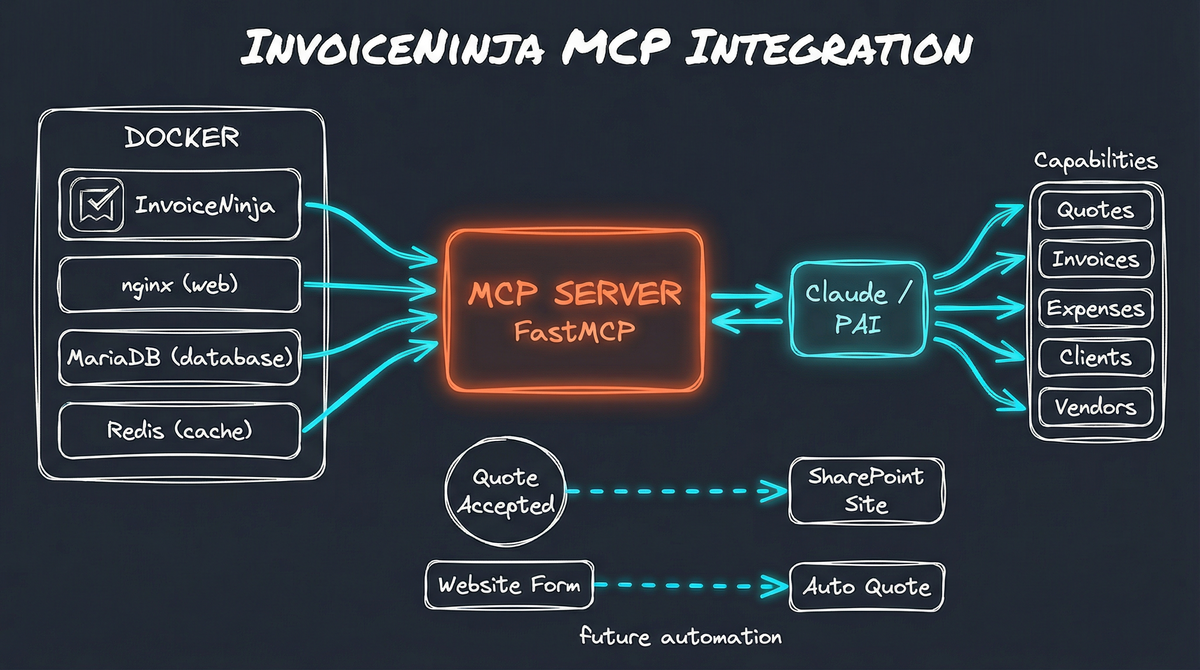
I built this system for a friend who runs a consulting business. Running a business means spending more time on invoicing than anyone would like. Creating quotes, tracking expenses, sending invoices, following up on payments—it’s necessary work, but it pulls attention away from actual client work.
So I did what any AI-obsessed technologist would do: I taught my AI to handle it.
The Goal: AI-Powered Business Operations
I wanted my Personal AI Infrastructure (PAI) to be able to:
- Create and send quotes when clients request pricing
- Track expenses as I incur them
- Generate invoices and manage their lifecycle
- Pull reports for tax preparation
- Eventually, trigger downstream workflows when business events happen
The foundation for all of this? InvoiceNinja—an open-source invoicing platform that I self-host on my own infrastructure.
Why Self-Hosted?
I could have used QuickBooks, FreshBooks, or any number of SaaS invoicing tools. But self-hosting InvoiceNinja gives me:
Full data ownership - My client data, financial records, and business documents live on my infrastructure. No vendor lock-in, no surprise price increases, no wondering what happens if the service shuts down.
API access without limitations - SaaS platforms often restrict API access to premium tiers or throttle requests. My instance has no such constraints.
Customization potential - I can modify the platform, integrate with other self-hosted services, and build automation without hitting vendor walls.
Cost efficiency - After the initial setup, the only ongoing cost is the compute resources I’m already running.
The Docker Stack
InvoiceNinja runs on a straightforward Docker Compose setup:
services:
  invoiceninja:
    image: invoiceninja/invoiceninja:5
    env_file: .env
    volumes:
      - ninja-public:/var/www/app/public
      - ninja-storage:/var/www/app/storage

  nginx:
    image: nginx:alpine
    ports:
      - "8082:80"
    volumes:
      - ninja-public:/var/www/app/public:ro

  db:
    image: mariadb:10.6
    volumes:
      - ninja-db:/var/lib/mysql

  redis:
    image: redis:alpine
Four containers: the InvoiceNinja application, nginx for web serving, MariaDB for data persistence, and Redis for caching. The whole stack spins up in under a minute and requires minimal maintenance.
Building the MCP Bridge
Getting InvoiceNinja running was the easy part. The real work was connecting it to my AI.
I started with a community MCP server for InvoiceNinja that provided read-only operations—listing invoices, viewing clients, pulling reports. Useful, but limited. I wanted my AI to actually do things.
So I extended it.
From Read-Only to Full Control
The original server could query data. My extended version adds write operations:
Quote Management
- Create quotes from product catalogs
- Email quotes to clients
- Convert accepted quotes to invoices
- Preview quote PDFs
Expense Tracking
- Create expenses with vendor associations
- Categorize for tax purposes
- Attach receipts (coming soon)
Invoice Operations
- Clone existing invoices
- Mark invoices as sent/paid
- Email invoices directly
- Download PDFs for records
Client & Vendor Management
- Create new clients and vendors
- Search existing records
- Update contact information
Here’s what a typical interaction looks like now:
Me: "Create a quote for Riverstone Brewing for the website
     redesign project - include the discovery workshop
     and initial design phase"

PAI: ✅ Quote created successfully!
     Quote #Q0003 (ID: xyz789)
     Client: Riverstone Brewing
     Total: $4,500.00

     📄 Preview URL: https://invoice.meekertechnologies.com/...

     Would you like me to email this to the client?
The AI knows my product catalog, understands my pricing structure, and can assemble quotes from natural language requests.
The Technical Details
The MCP server is built with FastMCP, a Python framework that makes creating Model Context Protocol servers straightforward. Each capability is exposed as a tool that Claude can invoke:
@mcp.tool()
async def create_quote(
    client_id: str,
    line_items_json: str,
    date: str = None,
    public_notes: str = None
) -> str:
    # Build quote payload
    # Submit to InvoiceNinja API
    # Return formatted result
The InvoiceNinja API is comprehensive and well-documented, which made extending the server relatively painless. The bulk of the work was mapping AI-friendly interfaces to API operations and handling edge cases gracefully.
What This Unlocks
Having AI control over my invoicing system opens up possibilities beyond simple automation:
Automated Quote Generation
Imagine a workflow where someone fills out a project inquiry form on my website. The form submission triggers PAI to:
- Create a new client record (or match to existing)
- Generate a quote based on the selected services
- Email the quote with a personalized message
- Add a follow-up reminder to my task list
No manual intervention required for standard requests. I review only when something needs customization.
Client Portal Provisioning
When a client accepts a quote, that event could trigger:
- Conversion of the quote to an invoice
- Creation of a dedicated SharePoint site for the project
- Provisioning of a secure OneDrive folder shared only with that client
- Generation of a project kickoff document with key dates
- Sending welcome materials with access instructions
Each client gets an isolated, secure space for file sharing—automatically created the moment they say yes.
Intelligent Expense Tracking
When I make a business purchase, I could forward the receipt to PAI, which:
- Extracts vendor, amount, and date from the receipt
- Matches to existing vendors or creates new ones
- Categorizes appropriately for tax purposes
- Creates the expense record in InvoiceNinja
- Flags anything unusual for my review
The tax prep nightmare becomes a non-event because everything is categorized as it happens.
Proactive Payment Follow-Up
PAI could monitor outstanding invoices and:
- Send friendly reminders at appropriate intervals
- Escalate tone for significantly overdue accounts
- Alert me when manual intervention might be needed
- Generate aging reports for cash flow planning
The awkward “just following up on invoice #123” conversation happens automatically.
The Bigger Picture
This InvoiceNinja integration is one piece of a larger vision: a business that largely runs itself for routine operations, freeing me to focus on the work that actually requires human judgment.
The pattern is consistent:
- Self-host critical systems - Own your data and your integrations
- Expose APIs via MCP - Give your AI the tools it needs
- Build workflows, not point solutions - Think in terms of business processes, not individual tasks
- Automate incrementally - Start simple, add sophistication as patterns emerge
Each system I bring into PAI’s reach makes the whole more capable. Email integrates with invoicing integrates with project management integrates with client communication. The boundaries between tools dissolve.
What’s Next
The immediate roadmap includes:
- Receipt scanning - OCR and attachment to expense records
- Time tracking integration - Automatic invoice generation from tracked hours
- Recurring invoice automation - Set-and-forget for retainer clients
- Financial reporting - AI-generated monthly summaries with insights
Further out, I’m exploring:
- Quote optimization - AI suggestions for pricing based on historical acceptance rates
- Cash flow forecasting - Predictive models based on invoice patterns
- Client health scoring - Early warning when accounts might need attention
The Self-Hosting Advantage
Every piece of this stack runs on infrastructure I control. When I want to add a feature, I add it. When I need to integrate with another system, there’s nothing stopping me. When I want to understand exactly how my data is being used, I can inspect every log and database table.
This isn’t about avoiding cloud services on principle—it’s about maintaining the flexibility to build exactly what I need. SaaS tools optimize for their average user. Self-hosted tools optimize for me.
And when that tool is the financial backbone of a business, that control matters.
Want to explore how Personal AI Infrastructure could streamline your business operations? I help individuals and organizations build AI systems that integrate with their existing workflows. Get in touch to discuss what’s possible.