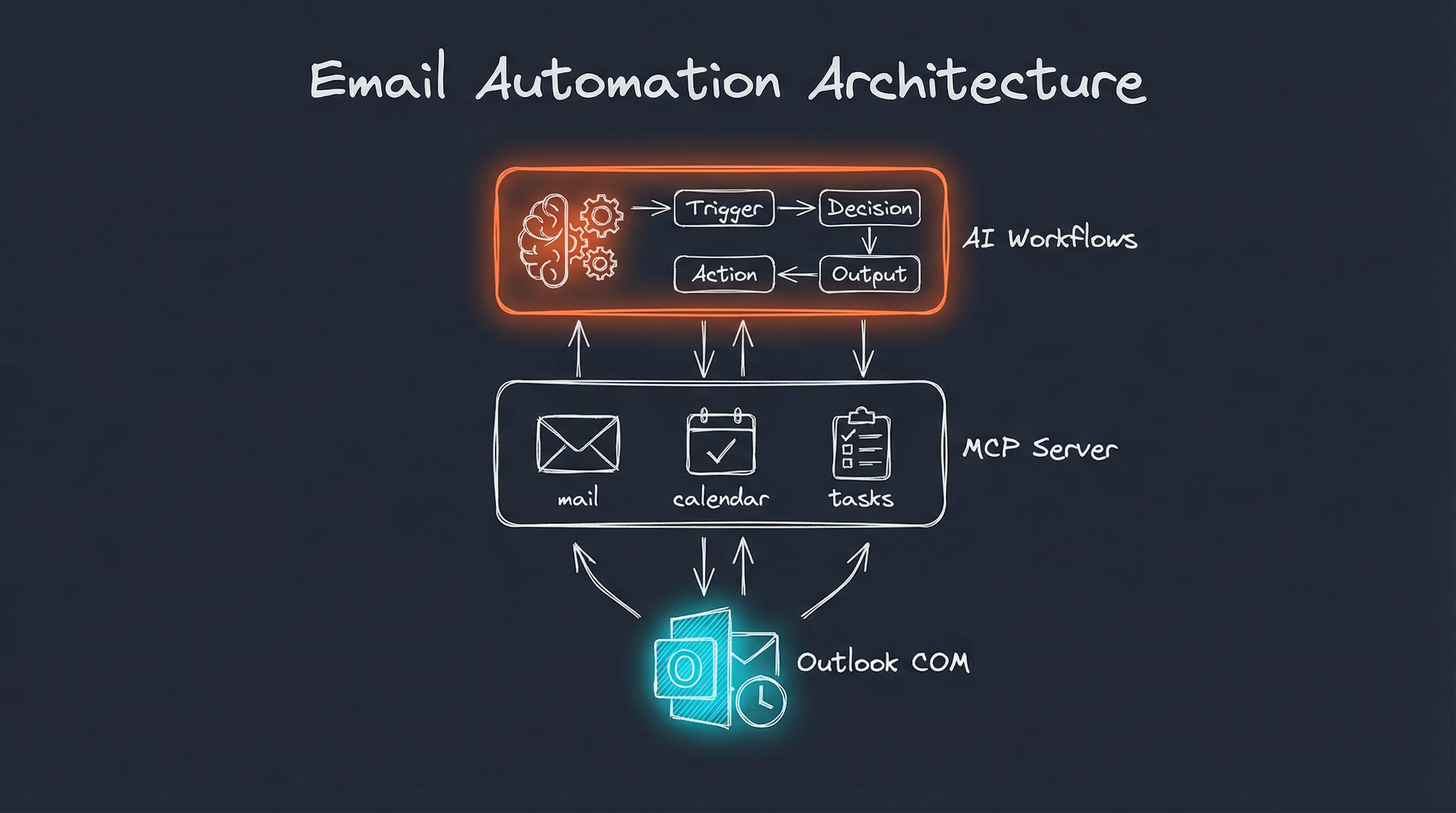
Email is broken. Not the technology - the experience. I have 18 email accounts across work, teaching, personal, and various project contexts. Every morning starts with the same ritual: open each inbox, scan for urgent items, delete the noise, maybe respond to a few. Repeat.
I built an AI agent to fix this.
The Architecture
The system has three layers:
- Outlook MCP Server - A Model Context Protocol server that exposes Outlook operations as AI-callable tools
- Outlook Skill - A Claude Code skill with workflows for common email tasks
- Email Organizer Agent - Higher-level automation for inbox cleanup and organization
Why Outlook COM API?
I chose Outlook’s COM API over cloud APIs (Graph, Gmail) for several reasons:
- Speed: Local data access is 10-100x faster than paging through cloud APIs
- Offline capability: Works without internet connectivity
- Full access: Calendar, tasks, contacts, rules - everything in one interface
- No API quotas: No rate limits or authentication token refreshes
The tradeoff? Windows-only. For my setup, that’s acceptable.
Zero Cloud Tokens: Local LLM Routing
Here’s the part that made this truly practical for bulk processing: all email-related LLM calls route to a locally-running Ollama instance.
I have over 120,000 emails across multiple accounts spanning 20+ years. Running that through a cloud API would cost hundreds of dollars and send decades of personal correspondence to external servers. Neither was acceptable.
The router logic detects email-related operations and redirects them to Ollama running on my local GPU:
Email triage request detected → Route to Ollama (llama3.2)
Email classification → Route to Ollama
Thread summarization → Route to Ollama
Draft composition → Route to Claude (quality matters here)
The result: I processed my entire email history - 120,000+ messages, zero tokens sent to AI providers. Everything ran offline on my own hardware.
For the initial bulk cleanup, local models are more than capable. They’re fast enough to process thousands of emails per hour and accurate enough for classification tasks. When I need higher quality (like drafting an important reply), the router can escalate to Claude.
This hybrid approach gives the best of both worlds: privacy and cost control for bulk operations, quality for high-stakes tasks.
What the MCP Server Exposes
The server provides 25+ tools across four categories:
Mail Operations
outlook_mail_list       - Get inbox messages (unread by default)
outlook_mail_search     - Search by subject keyword
outlook_mail_create_draft - Create draft (never auto-sends)
outlook_mail_categorize - Set categories on a message
outlook_mail_mark_read  - Mark as read/unread
outlook_mail_flag       - Flag/unflag for follow-up
outlook_mail_move       - Move to different folder
outlook_mail_attach_file - Attach file to draft
Calendar Operations
outlook_calendar_list   - List events in date range
outlook_calendar_create - Create event/meeting (saves only)
outlook_calendar_freebusy - Check attendee availability
Task Operations
outlook_tasks_list      - List tasks with filters
outlook_task_create     - Create new task
outlook_task_update_status - Update task status
Organization Tools
outlook_store_list      - Discover all mailboxes
outlook_folder_list     - List folders in a mailbox
outlook_contact_search  - Search contacts
outlook_rules_list      - List Outlook rules
Critical safety rule: Email operations only create drafts. The AI can compose and organize, but sending requires human confirmation.
The Skill Layer: Workflows
Raw tools aren’t enough. The Outlook Skill wraps them into workflows that handle common scenarios:
Morning Email Triage
When I say “triage my inbox,” the system:
- Fetches unread emails (up to 50)
- Runs each through a triage pattern that categorizes by urgency and action needed
- Applies Outlook categories based on results
- Flags urgent items
- Reports: “12 emails triaged - 2 urgent, 4 need response, 6 informational”
The triage pattern is a Fabric prompt that returns structured output:
- URGENCY: High/Medium/Low
- ACTION: Respond/Delegate/File/Delete
- CATEGORY: Meeting/Project/Newsletter/etc.
- NEXT STEP: Specific recommended action
Thread Summarization
Long email chains are exhausting. “Summarize this thread” runs the conversation through an extraction pattern that pulls out:
- Key participants and their positions
- Decisions made
- Open questions
- Commitments and deadlines
Five minutes of reading condensed to 30 seconds.
Draft Replies
“Draft a reply to Ben’s email about the Q1 timeline” triggers a workflow that:
- Finds the original email
- Gathers context from me about what I want to say
- Applies a drafting pattern for tone and structure
- Creates the draft in the appropriate mailbox
- Confirms: “Draft created in UIowa Drafts - review and send when ready”
The Email Organizer: Killing Marketing Spam
This is where it gets interesting.
I built a sender scanning system that analyzes entire mailboxes:
python scan_senders_outlook.py --mailbox "[email protected]"
It scans thousands of emails in seconds (local COM is fast), classifies every sender domain, and outputs:
SCAN COMPLETE: 45,232 items in 12.4s (3,647 items/sec)

Found 892 unique sender domains:
  MARKETING: 234 senders (18,432 emails)
  PROTECTED: 156 senders (24,891 emails)
  UNKNOWN: 502 senders (1,909 emails)
Classification System
Domains are classified into three buckets:
PROTECTED: Known legitimate senders (banks, employers, family domains). These never get touched automatically.
MARKETING: Newsletters, promotional emails, automated notifications. Candidates for cleanup.
UNKNOWN: Unclassified domains requiring human review.
Automated Cleanup
For MARKETING domains, the system can:
- Find unsubscribe links in email headers or body
- Click unsubscribe (with confirmation) for list-unsubscribe compliant senders
- Delete messages after unsubscribing
- Create Outlook rules to auto-delete future messages from that sender
One command processes hundreds of subscriptions I never signed up for.
Multi-Mailbox Intelligence
I manage 18 email accounts. The skill includes contextual routing:
| Context | Mailbox |
|---|---|
| Teaching/students | UIowa or Kirkwood based on context |
| Projects/clients | adammeeker.com |
| Personal/family | Gmail |
| Business/LLC | Meeker Technologies |
When I say “draft an email to my student about their grade,” the AI knows to use my university account. “Email a client about the project scope” routes to my projects account.
The Business Case
For individuals, this saves maybe 30-60 minutes daily on email management.
For organizations, the math gets more interesting:
- Knowledge workers spend 28% of their day on email (McKinsey)
- Average professional receives 121 emails daily (Campaign Monitor)
- Context switching costs 23 minutes per interruption (UC Irvine)
An AI agent that handles triage, organization, and drafting reduces that 28% significantly. Even a 50% improvement recovers substantial productive time.
Enterprise Considerations
The COM-based approach has tradeoffs for enterprise deployment:
Advantages:
- Works with existing Outlook installations
- No cloud API permissions needed
- Operates within existing security boundaries
- Handles on-prem Exchange seamlessly
Challenges:
- Requires Windows desktops
- Agent runs locally (not cloud-hosted)
- Each user needs their own instance
For sensitive projects, local operation is actually preferable - client data never leaves my machine.
Future Enhancements
Planned Improvements
Smart Priority Scoring: Train a model on my email interaction patterns. Which senders do I respond to immediately? Which sit for days? Use this to pre-sort incoming mail.
Meeting Prep Automation: Before calendar events, automatically pull relevant email threads, documents, and prior meeting notes. Generate briefing docs.
Relationship Intelligence: Track interaction patterns over time. Surface when I haven’t communicated with important contacts. Suggest reconnection.
Cross-Mailbox Search: Unified search across all 18 accounts. “Find all emails about the ACX project” regardless of which account received them.
Technical Roadmap
Graph API Fallback: Add Microsoft Graph as an alternative backend for non-Windows scenarios or shared mailbox access.
Email Templates: Store and apply templates for common response types. “Use my standard meeting request template.”
Sentiment Analysis: Flag emails with negative sentiment for priority handling. Catch problems before they escalate.
Getting Started
The Outlook skill and MCP server are part of my Personal AI Infrastructure setup. Key requirements:
- Microsoft Outlook running on Windows
- Claude Code with MCP server support
- Python with pywin32 for COM automation
The architecture is modular - you can use just the MCP server for tool access, or add the skill layer for workflow automation.
Lessons Learned
Start with safety constraints. The “drafts only” rule for email composition was non-negotiable from day one. AI makes mistakes. Review matters.
Local beats cloud for personal tooling. Cloud APIs are great for production services. For personal automation, local access is faster, simpler, and more private.
Classification is everything. The PROTECTED/MARKETING/UNKNOWN system made automated cleanup possible. Without it, the risk of accidentally deleting important email was too high.
Workflows > Tools. Individual MCP tools are building blocks. The skill layer that combines them into workflows is where the actual productivity gains happen.
Email doesn’t have to be a time sink. With the right automation layer, it becomes manageable. My inbox isn’t empty, but the signal-to-noise ratio is dramatically better.
The AI handles the mechanical work. I handle the thinking.
Interested in building your own Personal AI Infrastructure? I help individuals and organizations design AI systems that actually fit how they work. Get in touch if you’d like to explore what’s possible.