Most AI tools treat every conversation like you’re a stranger. You explain your context, your preferences, your constraints—over and over again. PAI changes that.
Personal AI Infrastructure (PAI) is a system that wraps AI with your context. It remembers your projects, knows your preferences, and can be extended to handle whatever you need. And the best part? It’s built on simple building blocks that anyone can understand and customize.
The Core Concept: AI That Knows You
Think of PAI as the difference between hiring a new contractor for every task versus having a trusted assistant who’s worked with you for years. The assistant knows:
- What projects you’re working on
- How you like things done
- What tools you use
- Who the people in your life are
PAI gives AI this same context. Every session starts with your personal configuration loaded. Every interaction benefits from accumulated knowledge.
Skills: The Secret to Extensibility
Here’s where it gets interesting. PAI’s power comes from skills—self-contained modules that teach the AI how to help with specific domains. And skills are just markdown files.
That’s it. No complex programming. No API integrations (unless you want them). Just structured text that tells the AI what you need.
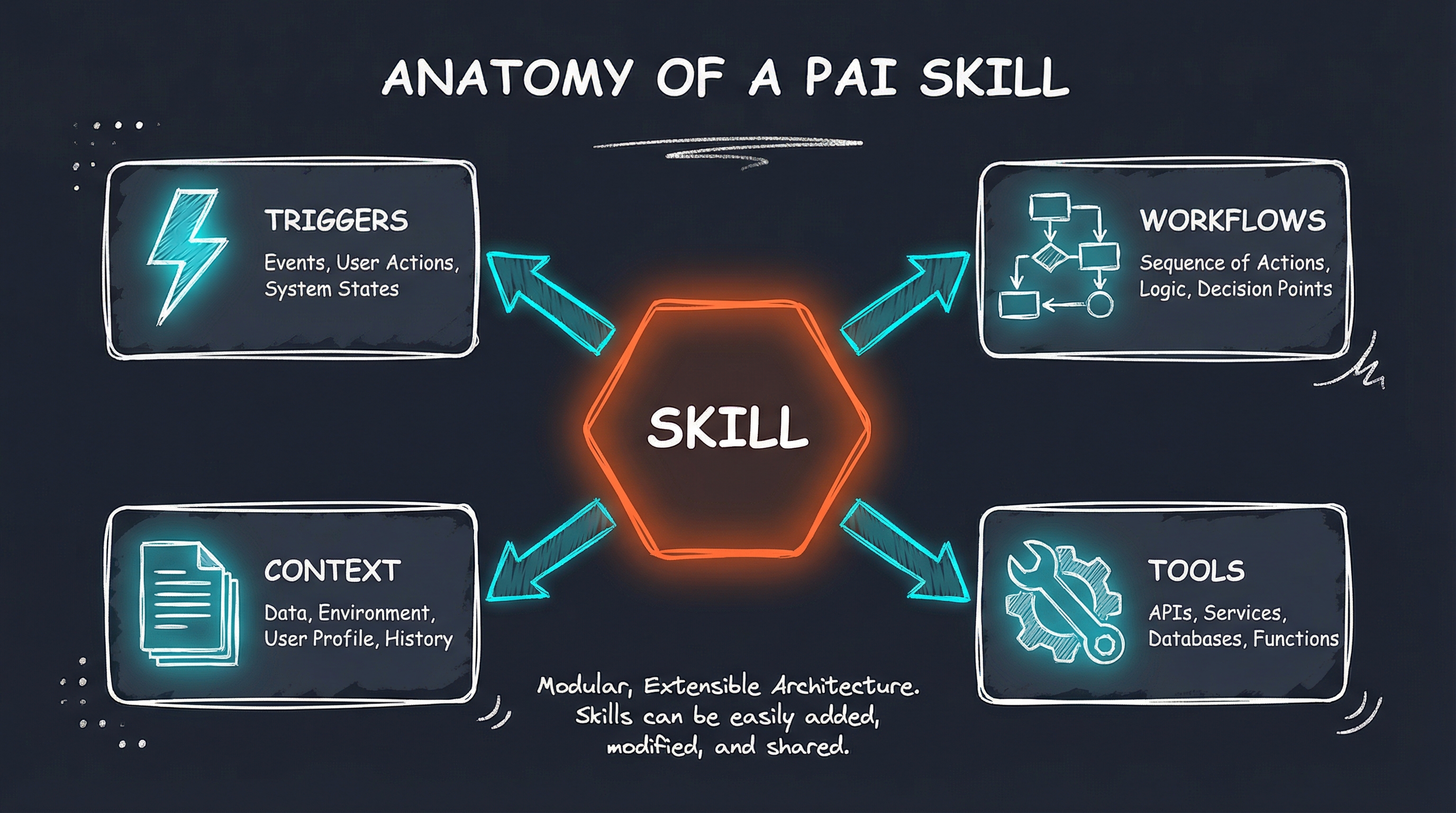
Anatomy of a Skill
Every skill has:
- A name and description - What it does and when to use it
- Triggers - Keywords that activate the skill
- Workflows - Step-by-step processes for common tasks
- Context - Reference information the AI needs
Here’s a real example from my Family skill:
---
name: Family
description: Family activity planning for life in Iowa City
  with two young daughters. USE WHEN user mentions family
  activity, weekend plans, trip planning, or family time.
---

# Family Skill

| Workflow | Trigger |
|----------|---------|
| ActivityPlan | "weekend activity", "what to do" |
| TripPlan | "plan trip", "vacation" |
| EventPlan | "birthday party", "special occasion" |

## Family Context

| Child | Age | Key Interests |
|-------|-----|---------------|
| Ellie | 9   | Reading, crafts, animals |
| Tessa | 5   | Dance, dress-up, outdoor play |
When I say “What should we do this weekend?”, PAI automatically knows:
- Both kids need to be able to participate
- Account for a 5-year-old’s attention span
- Suggest Iowa City area options
- Consider the season
No explanation needed. The context is built in.
Real Examples: Skills in Action
Gift Research
My GiftResearch skill tracks family members’ interests and automatically researches gift ideas:
User: "Find gift ideas for Ellie's birthday"
→ Reads her current interests (books, art supplies, animals)
→ Searches preferred retailers (Amazon, Costco)
→ Filters by age-appropriateness
→ Emails me a curated list with prices and links
The skill knows:
- Which retailers I prefer (and in what order)
- Family birthdays (so it can remind me 4 weeks out)
- Past gifts (to avoid duplicates)
- Quality criteria (4+ star ratings, in-stock items)
Teaching Support
As an adjunct instructor at the University of Iowa, I have a Teaching skill that helps with:
- Drafting responses to student emails
- Creating assignment rubrics
- Generating lecture discussion questions
- Managing course materials
It knows my courses, my teaching style, and the university’s academic calendar.
Work Integration
My Qualtrics skill understands my day job managing customer experience analytics at Agilent Technologies. It helps with:
- Survey design best practices
- Dashboard analysis
- CX metric calculations (NPS, CES, CSAT)
- Report formatting for stakeholders
Each skill is customized to how I work, not generic advice.
Why This Matters
The traditional approach to AI is horizontal—one tool that does everything okay but nothing great. PAI is vertical—specialized capabilities that go deep on what matters to you.
Consider the difference:
| Generic AI | PAI with Skills |
|---|---|
| “Help me plan a trip” | Knows your kids’ ages, your family’s preferences, budget constraints, and past destinations |
| “Draft an email” | Knows your tone, your signature, and the context of your relationships |
| “Research this topic” | Knows which sources you trust, how deep to go, and what format you want the output in |
Building Your Own Skills
Creating a skill is straightforward:
- Create a folder with your skill name
- Write a SKILL.md file with the description and triggers
- Add workflows for common tasks
- Include reference docs with context the AI needs
That’s literally it. No coding required for basic skills.
Want more power? Skills can also include:
- Tools - Scripts that do things (send emails, scrape websites, query databases)
- Integrations - Connections to external services via MCP servers
- Automation - Hooks that trigger actions based on events
But you don’t need any of that to start. A simple markdown file with good context gets you 80% of the value.
The Extensibility Philosophy
PAI is built on a simple principle: start with structure, add complexity only when needed.
A new skill might begin as 20 lines of markdown. Over time, as you discover patterns and needs, you add:
- More workflows for specific tasks
- Reference documents with domain knowledge
- Tools for automation
- Integrations with external services
The system grows with you. Nothing is wasted.
What It Looks Like Day-to-Day
On a typical day, I might:
- Morning: Ask PAI to summarize overnight emails, filtering by priority
- Work: Use the Qualtrics skill to draft a dashboard analysis
- Afternoon: Have PAI research a topic using my preferred sources
- Evening: Ask what family activities might work for the weekend
Each interaction benefits from accumulated context. The AI isn’t starting from scratch—it’s building on everything it knows about my work, my family, and my preferences.
Getting Started
If this sounds useful, here’s the path I’d recommend:
- Start with one skill - Pick a domain where you repeat similar tasks
- Document your context - What does someone need to know to help you effectively?
- Define workflows - What are the common patterns in how you work?
- Iterate - Add detail as you discover gaps
You don’t need to build the whole system at once. PAI is designed to grow incrementally.
The Bigger Picture
Personal AI Infrastructure isn’t about replacing human judgment—it’s about amplifying human capability. The AI handles research, drafting, and routine decisions. You handle strategy, relationships, and creative thinking.
Done right, PAI makes you more effective without making you dependent. The system knows your context, but you remain in control of the decisions.
That’s the future I’m building toward. Not AI that replaces people, but AI that makes people better at what they do.
Interested in building your own Personal AI Infrastructure? I help individuals and organizations design AI systems that actually fit how they work. Get in touch if you’d like to explore what’s possible.