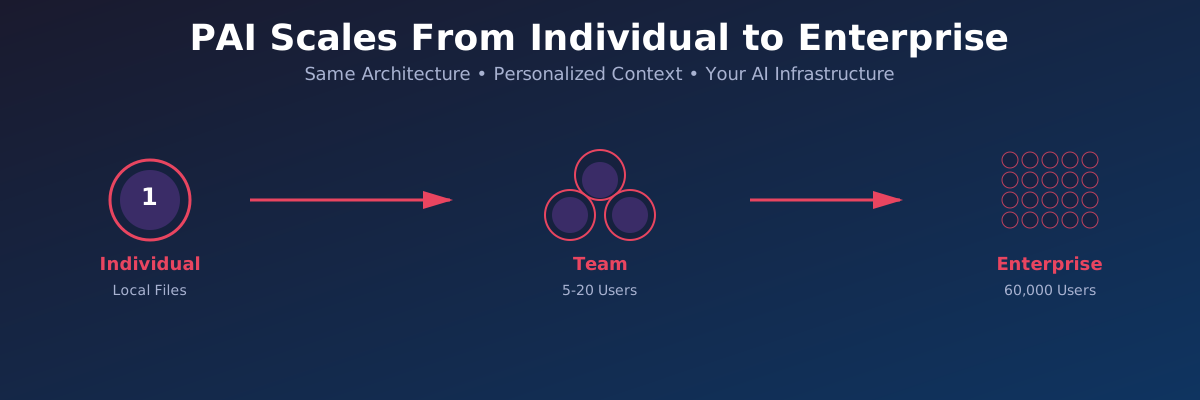
One of the most powerful aspects of Personal AI Infrastructure isn’t just what it can do - it’s who it can serve. The same architecture that transforms my individual productivity can scale to empower a small team, a growing company, or an enterprise with 60,000 employees.
The secret? Every user gets their own personalized PAI with their personal context and relevant skills. No shared generic chatbot. No one-size-fits-all solution. Your AI, with your context, working your way.
The PAI Architecture: Built to Scale
At its core, PAI is elegantly simple:
- Plain text files stored locally on your machine
- Markdown-based skills, workflows, and documentation
- Context-aware prompts that pull only relevant information
- Structural elements built into PAI’s core
- Claude Code tool hooks that supercharge frontier AI with your context
This isn’t complex infrastructure requiring cloud deployments, database clusters, or DevOps teams. It’s files on disk orchestrated by intelligent tooling.
Why This Matters
For the individual: Zero configuration overhead. Your AI adapts to you, not the other way around.
For teams: Everyone gets their own PAI instance, customized to their role, with access to shared team skills.
For enterprises: 60,000 employees each have personalized AI that knows their department, projects, and workflows - without centralized data lakes or compliance nightmares.
Scaling PAI: Three Scenarios
Scenario 1: Individual Knowledge Worker
I’m a university professor and researcher. My PAI contains:
- Personal context (Telos file): My goals, projects, priorities, and mission
- Work skills: Email automation, calendar management, teaching support, Qualtrics expertise
- Family skills: Activity planning, gift research, personalized for my daughters
- Research workflows: Multi-source analysis, content extraction, Fabric pattern integration
- Custom integrations: Home Assistant for audio announcements, Chatterbox for TTS voices
Everything runs locally. My context never leaves my machine. The system is mine.
Value: I reclaim 10-15 hours per week. My AI remembers context across conversations. Skills compound over time.
Scenario 2: Small Team (5-20 people)
Imagine a small professional services firm with 12 people. Each team member has their own PAI instance:
Shared team assets:
- Company skill library (40+ standardized skills)
- Workflow templates (client onboarding, proposal generation, research protocols)
- Approved prompts and patterns
- Common tools and integrations
Personalized per-user:
- Individual client history and context
- Personal working style and preferences
- Role-specific skills (sales vs. delivery vs. research)
- Private notes and learnings
How it works:
- Team maintains a shared PAI repository with core skills
- Each user clones and customizes their own PAI
- Updates to shared skills sync via
git pull - Individual customizations stay private in their own workspace
Value: Team consistency with individual flexibility. New hires onboard in hours with pre-built skills. Tribal knowledge gets captured in reusable workflows.
Scenario 3: Enterprise at Scale (60,000 employees)
Now imagine a Fortune 500 company rolling out PAI across the entire organization.
Enterprise PAI Distribution:
Enterprise PAI Repository (Central)
├── Core Skills (company-wide)
│   ├── Email & Calendar Management
│   ├── Meeting Prep & Summarization
│   ├── Document Generation (branded templates)
│   ├── Research & Analysis
│   └── Compliance & Security protocols
├── Department-Specific Skills
│   ├── Sales/ (CRM integration, proposal generation)
│   ├── Engineering/ (code review, documentation, testing)
│   ├── Finance/ (reporting, analysis, forecasting)
│   ├── HR/ (recruiting workflows, onboarding)
│   └── Marketing/ (campaign planning, content creation)
└── Integration Modules
    ├── Salesforce connector
    ├── JIRA/ServiceNow integration
    ├── SharePoint/OneDrive access
    └── Internal knowledge base search
Per-Employee PAI Instance:
User's Local PAI (~/.pai/)
├── Skills/
│   ├── [90 core enterprise skills] ← synced from central repo
│   ├── [Department skills for their role] ← relevant subset
│   └── [Custom personal skills] ← user's own workflows
├── Config/
│   ├── user_profile.md ← name, role, department, projects
│   ├── preferences.json ← personal settings
│   └── integration_keys.env ← encrypted API tokens
└── History/
    └── [User's conversation history] ← private, local only
How employees interact:
Morning briefing: “What’s on my calendar today and what prep do I need?”
- PAI knows their role, current projects, and meeting context
Email triage: “Summarize my overnight emails and draft responses for the urgent ones.”
- Uses company email templates and tone guidelines
Project work: “Pull the Q4 sales data and create a forecast for my region.”
- Accesses Salesforce (with permissions), uses company analysis templates
Documentation: “Generate a technical design doc for the auth refactor project.”
- Uses company documentation standards, knows team members and architecture
Enterprise value:
- 60,000 employees × 10 hours saved/week = 600,000 hours/week = 300 FTE in productivity gains
- Zero central infrastructure - runs on existing workstations
- Complete data privacy - sensitive context stays on local machines
- Compliance-friendly - audit logs, access controls, encrypted storage
- Scalable skill development - skills built once, deployed to thousands
- Rapid skill updates - push critical updates via
git pull
The Skills: PAI’s Superpower
What makes PAI uniquely powerful is the skills system. Skills are:
- Markdown-based workflows with structured prompts
- Tool-integrated using Claude Code hooks
- Composable - skills call other skills
- Customizable - fork, modify, extend
- Shareable - copy between PAI instances
Core PAI Distribution includes:
- Email - Triage, draft, schedule, search, unsubscribe
- Research - Multi-source parallel analysis with 242+ Fabric patterns
- Contacts - CRM with relationship context
- Teaching - Course design, grading, Canvas integration
- Family - Activity planning, gift research
- Business documents - Document packs (quotes, contracts, NDAs)
- System utilities - Git workflows, CLI generation, skill creation
Custom skills emerge organically:
- “Generate Qualtrics dashboard for this NPS data”
- “Create morning briefing audio with professional voice clone”
- “Monitor PAI agent activity in real-time dashboard”
- “Sync upstream Miessler repositories”
The skill library grows with use. What starts as a one-off task becomes a reusable workflow. Individual innovations become team assets. Team patterns become enterprise standards.
The Technical Foundation
PAI’s scalability comes from its technical architecture:
1. Local-First Design
Everything lives on your local machine:
- Skills:
~/.pai/Skills/ - History:
~/.pai/History/ - Config:
~/.pai/.claude.json
Why this matters:
- No cloud sync delays
- Works offline
- No data egress costs
- Complete privacy control
2. Context Management
PAI doesn’t load everything into every prompt. It’s smarter than that:
// Only load what's relevant for THIS task
const context = {
  telos: loadIfPersonal(),
  skillDocs: loadForCurrentSkill(),
  recentHistory: loadLastNConversations(3),
  projectContext: loadIfTaskRelated()
}
Result: Prompts stay focused. Costs stay low. Context stays relevant.
3. Tool Hooks: The Secret Sauce
Claude Code’s hook system is where PAI becomes magic:
Available hooks:
SessionStart- Load PAI core context automaticallyBeforeToolCall- Inject skill-specific contextAfterToolCall- Capture learnings to historySessionEnd- Archive session summary
Example: SessionStart hook
// Automatically loads CORE skill context at session start
// User doesn't type anything - PAI just knows its identity
This is unique to Claude Code. No other AI platform offers this level of programmatic control over context injection.
4. Deterministic Workflows
PAI follows the “Prompts Wrap Code” principle:
- CLI tools do deterministic work (file manipulation, API calls, data processing)
- AI prompts handle reasoning, decision-making, and creativity
- Workflows orchestrate the combination
Example:
# Deterministic: Extract blog post metadata
extract-frontmatter post.md

# AI reasoning: Generate narrator script
claude "Rewrite this blog post as a 2-minute narration"

# Deterministic: Generate audio
chatterbox-tts "$(cat narration.txt)" > audio.wav
The result: Reliable, repeatable, scalable.
From Prototype to Production
Individual adoption (Day 1):
- Clone PAI repository
- Run setup script
- Start using core skills
- Add personal customizations over time
Team rollout (Week 1):
- Fork PAI repo for team
- Add team-specific skills
- Document team conventions
- Onboard team members one-by-one
Enterprise deployment (Month 1):
- Security review and compliance approval
- Create enterprise PAI distribution
- Build department skill packs
- Integrate with corporate systems (SSO, logging, etc.)
- Pilot with 50-100 early adopters
- Gather feedback, iterate
- Roll out by department
The beauty: All three scenarios use the same PAI core. The architecture doesn’t change. Only the skill library and integration depth scale.
Why PAI Will Win
Most enterprise AI deployments fail because they:
- Require massive infrastructure - PAI runs on existing machines
- Need centralized data - PAI keeps data local and private
- Impose rigid workflows - PAI adapts to how users work
- Demand constant connectivity - PAI works offline
- Suffer from generic responses - PAI has personal context
PAI inverts all of these:
- ✅ Zero infrastructure (runs locally)
- ✅ Zero central data (privacy by design)
- ✅ Infinite flexibility (skills are just markdown)
- ✅ Offline capable (local files, local AI)
- ✅ Deeply personalized (your context, your workflows)
What’s Next
The PAI vision is clear:
- Refine the core - Make setup easier, documentation better, patterns clearer
- Expand the skill library - 100+ high-quality skills in the distribution
- Build integrations - Salesforce, JIRA, Slack, Teams, SharePoint, etc.
- Enable sharing - Skill marketplace, team templates, best practice libraries
- Prove enterprise scale - Deploy in a Fortune 500 company, measure ROI
The infrastructure exists. The patterns work. The architecture scales.
Now it’s about adoption, education, and ecosystem.
If you’re an individual knowledge worker: Install PAI today. Start with the core skills. Customize for your workflow.
If you’re a team lead: Clone PAI for your team. Build your first shared skill. Experience the multiplier effect.
If you’re an enterprise IT leader: Let’s talk. PAI is ready for production deployment at scale.
This is part of my ongoing series on building and extending Personal AI Infrastructure. See also: PAI Explained: How Personal AI Infrastructure Works and PAI Goes Mobile: Accessing Your Personal AI From Anywhere.